


 |
MOA611S - MEDICAL OFFICE APPLICATIONS 2A - 1ST OPP - JUNE 2025 |
|
|
1 Page 1 |
▲back to top |
nAmlBIA UnlVERSITY
OF SCIErlCE Ano TECHnOLOGY
FACULTY OF COMMERCE, HUMAN SCIENCES AND EDUCATION
DEPARTMENT OF GOVERNANCE AND SCIENCES, HOSPITALITY, TECHNICAL AND
VOCJ\\TIONAL EDUCATION AND TRAINING
QUALIFICATION: BACHELOR OF BUSINESS & INFORMATION ADMINISTRATION
QUALIFICATION CODE: 07BBIA LEVEL: 6
COURSE CODE: MOA611S
COURSE NAME: MEDICAL OFFICE APPLICATIONS 2A
SESSION: JUNE 2025
PAPER: PRACTICAL PAPER 1
DURATION: 3 HOURS
MARKS: 150
EXAMINER(S)
FIRST OPPORTUNITY EXAMINATION QUESTION PAPER
Ms Lindie Tripodi
MODERATOR: Ms Petrina Lauw
INSTRUCTIONS
1. Answer ALL the questions.
2. Read all the questions carefully before answering.
THIS QUESTION PAPER CONSISTS OF 7 PAGES {Including this front page)
|
|
2 Page 2 |
▲back to top |
Question 1
June 2025
Question 1
Marks: 20
With its strong corporate social responsibility initiatives, MTC has supported health
awareness campaigns in the past. They could partner with health organisations to
promote an obesity awareness conference.
The event will take place on the 28th of June 2025. Start with the preparations on the
29th of May 2025. As the event planner, you are responsible for organising of this very
important conference
NR NAME OF TASK
1. Conduct a Needs Assessment
2. Book a Venue
3. Design Social Media Campaigns
4. Develop Educational Materials
5 Arrange for Gifts and Snacks
6. Programme Design
7. Engage Loca 11nfluencers
8. Partner with Local Organisations
9. Programme Director
10. Confirm guest list
11. Final check-ups and logistics
TASKDURATION RESOURCES
2 Days
Anzelle
1 Day
Aune
3 Days
John
3 Days
Aune
2 Days
Anzelle
2 Days
Aune
2 Days
John
2 Days
Aune
2 Days
Anzelle
2 Days
Aune
1 Days
John
1. Create the following milestones for this event:
Depositof50%to be paid for the:
(a) Venue
(b) Design Social Media Campaigns
(c) Gifts and Snacks
Full Payments to be made for the:
(a) Development of the Educational
{b) Local Influencers
Materials
2. Please add predecessors for each milestone.
3. Assign resources to the tasks as indicated above.
4. Insert your Name in the Header, save your document and print only page 1 and 2 in
landscape.
|
|
3 Page 3 |
▲back to top |
Question 2
June 2025
QUESTION 2
MARKS: 30
In Ms Word create the following form on one sheet. Adhere to typing rules and instructions
Given on the next page. Use the font Arial, size 12.
Ai In Education Conference 2025
Font: Aptos, size 18, bold, u/c, cent
Attendee Registration Form
Font: Times New Roman, size 12, bold, cent
;fa
Thank you for your interest in attending the Al in Education Conference 2025. Please
complete the form below to register.
Personal Information
u/c, bold, font: Arial, size 12
Full Name: Plain Te>:tControl - Strong
Replace content controls with the
Designation/Job Title: Plain Text Control - Strong
following information:
d/s
> Full name: Your own name and surname
Institution/Organization: Plain Text Control Emphasis
Designation: Student
Institution: NUST
Country: RichText Control - Intense Emphasis
Country: Namibia
Conference Participation ----------i>
u/c, bold
1. Attendance Mode (select one):
0 In-Person
} ~I n-se-rt-Ch_e-_Bco__kx_e_s
0 Virtual (Online)
Q Hybrid
on the left of the
different options.
2. Which sessions are you interested in?
D AI in Personalised Learning
}
D Ethical Considerations of AI in Education
D AI-Powered Assessment and Feedback
D Future Trends of AI in Education
Insert Check Boxes
on th e left of t he
different options.
'---------
Agreement & Consent -----------1>
u/c, bold, cent
By submitting this form, I confirm that the information provided is accurate. I agree to
comply with the event's guidelines and privacy policies.
il
Insert rich content control {Strong) and replace with
Signature (Full Name and Surname): -I> your title, initial and surname.
Date: ------------
Delete the line and replace with full date (today's
date)
|
|
4 Page 4 |
▲back to top |
3
Question 3
Question 3
Marks: 25
Retrieve the MS Word Template from your templates in Ms Word and adhere to all
instructions.
1. Open the MS Word template 11Circle Flyer."
2. Replace 11 EVENTNAME" with Summer Sale Extravaganza (Font: Aptos, font size 36,
U/C, Bold, Cent). Type each word in separate line (Centre Horizontally).
3. Use the drawing tool and draw the following table in the space below the main
heading. Type the content in font: Calibri, Size 10.
Item
Laptop
Headphones
Smartphone
Tablet
Unit Price
560
40
300
250
Quantity
3
7
4
3
Total Price
Instructions for Table:
3.1 Type column headings in u/c and bold.
3.2 Use the correct formula and calculate the Total Price of each item (Unit Price x
Quantity).
3.3 Insert a row at the end. Type the word Total in (u/c, bold) and calculate the total of
the Unit Price, Quantity and Total columns.
3.4 Autofit table to content.
3.5 Distribute rows evenly.
3.6 Centre table.
4.
Delete 11Add Key Event Info Here" and replace with 11Take Note!" (bold, cent)
Delete the text and replace with the following. No Textbox:
TAKENOTE! ------o;::
I Font: Candara, Size 20, Bold, Cent
The Summer Sale Extravaganza is the ultimate event}
of the season, offering incredible discounts on the
latest tech gadgets and accessories.
1:-
Date: 15 August 2025
Location: Ongwediva Sports Field
Time: 08:00 - 17:00
I bold, s/s
~--~
Type in two lines, cent position. Type
"Summer Sale Extravaganza"
in bold, s/s. Type the rest of the
sentence {Font: Comic Sans, Size: 10).
Don't miss out on discounts of up to 50% off- experience the future of technology!
I Type in one line, bold, italics,
I centre.
|
|
5 Page 5 |
▲back to top |
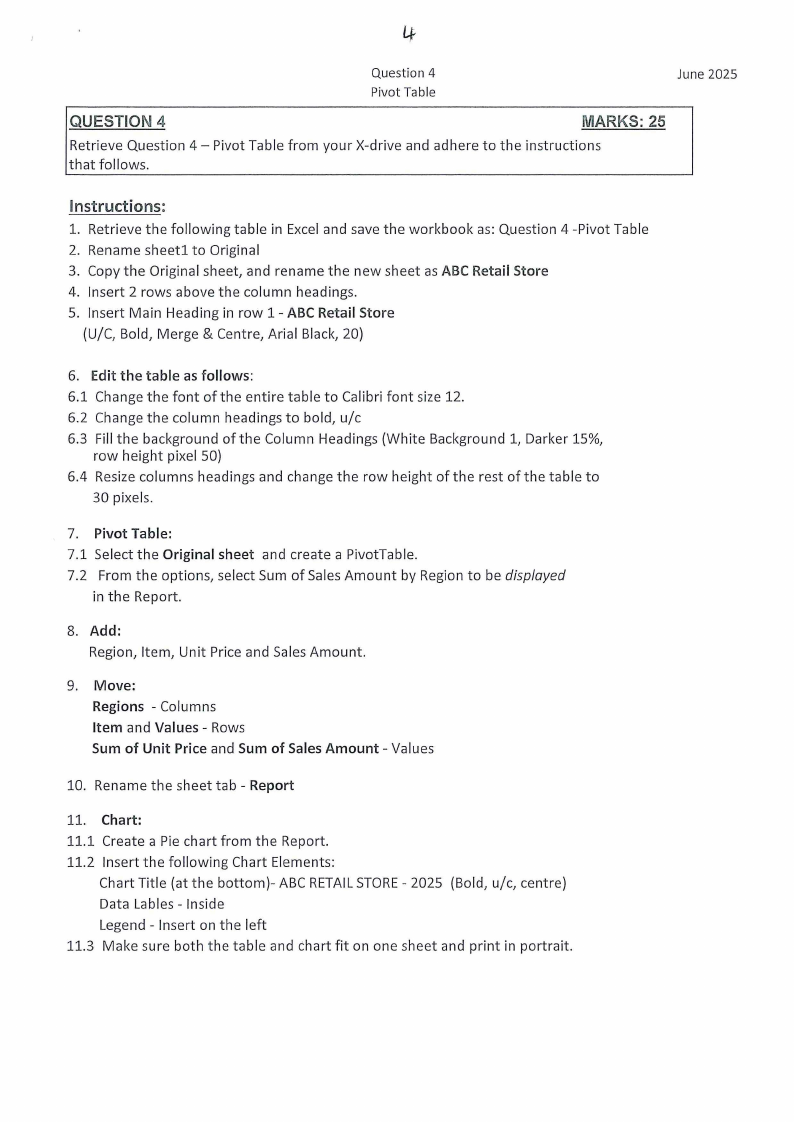
Lf
Question 4
Pivot Table
June 2025
QUESTION 4
MARKS: 25
Retrieve Question 4 - Pivot Table from your X-drive and adhere to the instructions
that follows.
Instructions:
1. Retrieve the following table in Excel and save the workbook as: Question 4 -Pivot Table
2. Rename sheetl to Original
3. Copy the Original sheet, and rename the new sheet as ABC Retail Store
4. Insert 2 rows above the column headings.
5. Insert Main Heading in row 1 - ABC Retail Store
(U/C, Bold, Merge & Centre, Arial Black, 20}
6. Edit the table as follows:
6.1 Change the font of the entire table to Calibri font size 12.
6.2 Change the column headings to bold, u/c
6.3 Fill the background of the Column Headings (White Background 1, Darker 15%,
row height pixel 50}
6.4 Resize columns headings and change the row height of the rest of the table to
30 pixels.
7. Pivot Table:
7.1 Select the Original sheet and create a PivotTable.
7.2 From the options, select Sum of Sales Amount by Region to be displayed
in the Report.
8. Add:
Region, Item, Unit Price and Sales Amount.
9. Move:
Regions - Columns
Item and Values - Rows
Sum of Unit Price and Sum of Sales Amount - Values
10. Rename the sheet tab - Report
11. Chart:
11.1 Create a Pie chart from the Report.
11.2 Insert the following Chart Elements:
Chart Title (at the bottom)- ABC RETAILSTORE- 2025 (Bold, u/c, centre)
Data Lables - Inside
Legend - Insert on the left
11.3 Make sure both the table and chart fit on one sheet and print in portrait.
|
|
6 Page 6 |
▲back to top |
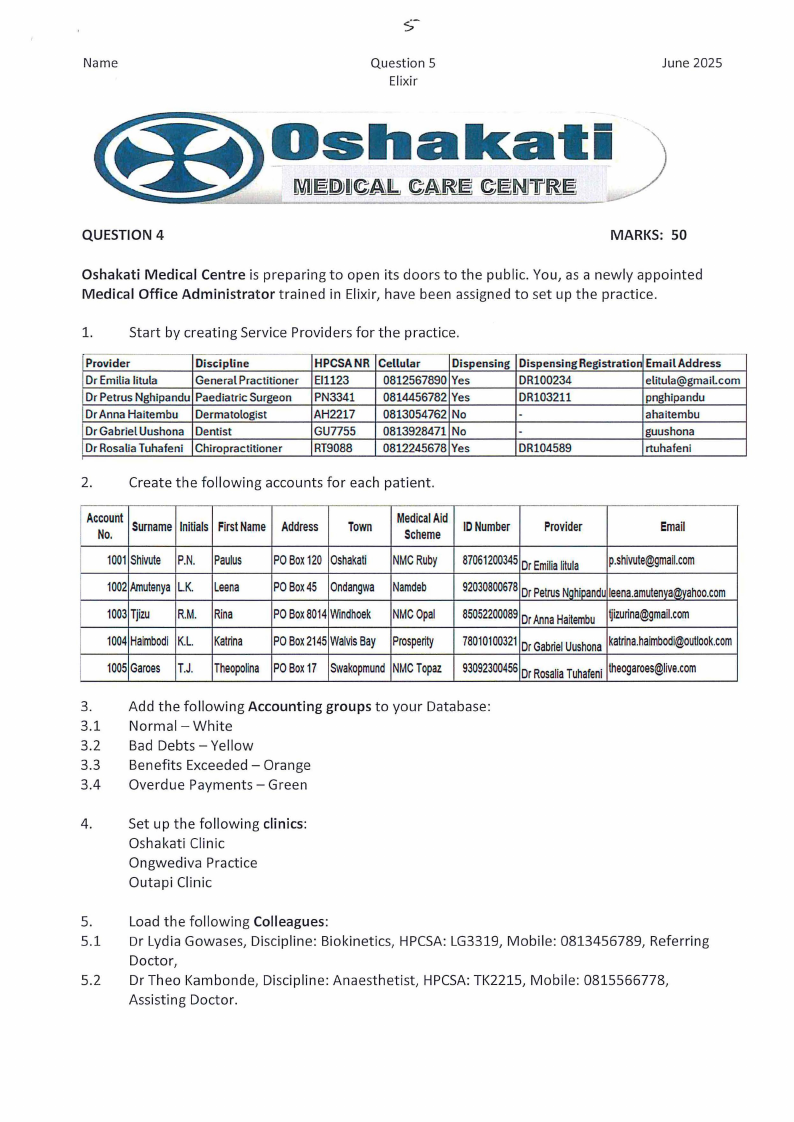
Name
Question 5
Elixir
June 2025
QUESTION 4
MARKS: 50
Oshakati Medical Centre is preparing to open its doors to the public. You, as a newly appointed
Medical Office Administrator trained in Elixir, have been assigned to set up the practice.
1.
Start by creating Service Providers for the practice.
Provider
Discipline
Dr Emilia litula
General Practitioner
Dr Petrus Nghipandu Paediatric Surgeon
Dr Anna Haitembu Dermatologist
Dr Gabriel Uushona Dentist
Dr Rosalia Tuhafeni Chiropractitioner
HPCSANR
Ef1123
PN3341
AH2217
GU7755
RT9088
Cellular
0812567890
0814456782
0813054762
0813928471
0812245678
Dispensing
Yes
Yes
No
No
Yes
Dispensing Registration Email Address
DR100234
elitula@gmail.com
DR103211
pnghipandu
-
ahaitembu
-
guushona
DR104589
rtuhafeni
2.
Create the following accounts for each patient.
AcNcoo.unSt urnameInitialsFirsNt ame Address
Town
MedicaAlid
Scheme
IDNumber
Provider
Email
1001Shivute P.N. Paulus POBox120 Oshakati NMCRuby 870612003D4r5Emilliiatula p.shivute@gmail.com
1002AmutenyLa.K. Leena POBox45 OndangwaNamdeb 920308006D7rP8 etruNsghipanldeuena.amutenya@yahoo.com
1003Tjizu R.M. Rina
POBox8014Windhoek NMCOpal 850522000D8rA9 nnHaaitembutjizurina@gmail.com
1004HaimbodKi.L. Katrina POBo2x145WalviBsay Prosperity 780101003D2rG1 abrieUlushonkaatrina.haimbodi@outlook.com
1005Garces T.J. TheopolinaPOBox17 SwakopmuNnMdCTopaz 930923004D5rR6 osalTiauhafenthi eogaroes@live.com
3.
Add the following Accounting groups to your Database:
3.1 Normal - White
3.2 Bad Debts - Yellow
3.3 Benefits Exceeded - Orange
3.4 Overdue Payments - Green
4.
Set up the following clinics:
Oshakati Clinic
Ongwediva Practice
Outapi Clinic
5.
Load the following Colleagues:
5.1 Dr Lydia Gowases, Discipline: Biokinetics, HPCSA:LG3319, Mobile: 0813456789, Referring
Doctor,
5.2 Dr Theo Kambonde, Discipline: Anaesthetist, HPCSA:TK2215, Mobile: 0815566778,
Assisting Doctor.
|
|
7 Page 7 |
▲back to top |
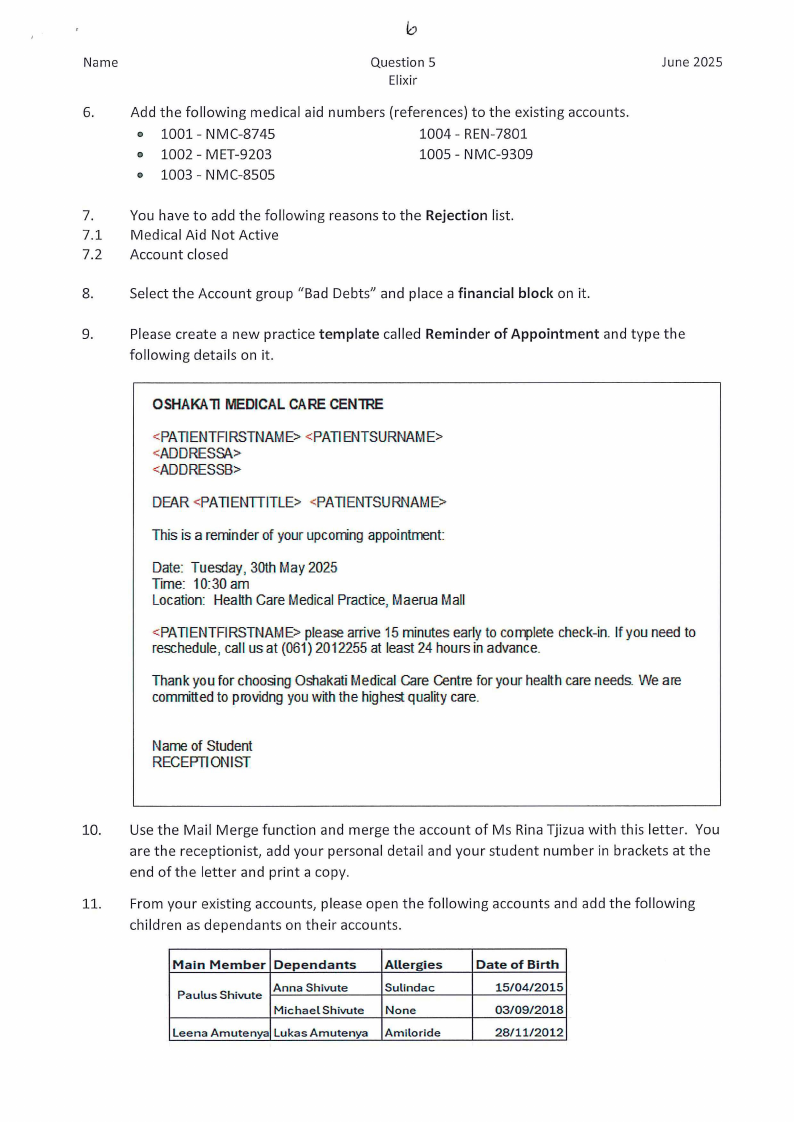
Name
Question S
Elixir
6.
Add the following medical aid numbers (references) to the existing accounts.
o 1001- NMC-8745
o 1002 - MET-9203
1004 - REN-7801
1005 - NMC-9309
o 1003 - NMC-8505
June 2025
7.
You have to add the following reasons to the Rejection list.
7.1 Medical Aid Not Active
7.2 Account closed
8.
Select the Account group "Bad Debts" and place a financial block on it.
9.
Please create a new practice template called Reminder of Appointment and type the
following details on it.
OSHAKA11MEDICALCARECENlRE
<PATIENTFIRSTNAME> <PATIENTSURNAME>
<ADDRESS/\\>
<ADDRESSB>
DEAR <PATIENTTITLE> <PATIENTSURNAME>
This is a reminderof yourupcomingappointment:
Date: Tuesday, 30th May 2025
Time: 10:30 am
Location: HealthCare MedicalPractice,MaeruaMall
<PATIENTFIRSTNAME>pleasearrive 15minutesearlyto completecheck-in.If you needto
reschedule,call us at (061)2012255at least 24 hours in advance.
Thank you for choosingOshakatiMedicalCare Centrefor your healthcareneeds.We are
committedto providngyouwith the highestqualitycare.
Nameof Student
RECEPTIONIST
10. Use the Mail Merge function and merge the account of Ms Rina Tjizua with this letter. You
are the receptionist, add your personal detail and your student number in brackets at the
end of the letter and print a copy.
11. From your existing accounts, please open the following accounts and add the following
children as dependants on their accounts.
Main Member Dependants
Paulus Shivute
Anna Shivute
Michael Shivute
Leena Amutenya Lukas Amutenya
Allergies
Sulindac
None
Amiloride
Date of Birth
15/04/2015
03/09/2018
28/11/2012