


 |
BAP611S - BUSINESS APPLICATIONS 2A - 1ST OPP - JUNE 2025 |
|
|
1 Page 1 |
▲back to top |
nAm I BIA un IVE RSITY
OF SCIEnCE Ano TECHn0L0GY
FACULTY OF COMMERCE, HUMAN SCIENCES AND EDUCATION.
DEPARTMENT OF GOVERNANCE AND SCIENCES, HOSPITALITY, TECHNICAL AND
VOCATIONAL EDUCATION AND TRAINING
QUALIFICATION: BACHELOR OF BUSINESS & INFORMATION ADMINISTRATION
QUALIFICATION CODE: 07BBIA
LEVEL: 6
COURSE CODE: BAP611S
COURSE NAME: BUSINESS APPLICATIONS 2A
SESSION: JUNE 2025
PAPER: PRACTICAL PAPER 1
DURATION: 2 HOURS
MARKS: 100
EXAMINER{S)
FIRST OPPORTUNITY EXAMINATION QUESTION PAPER
Ms Lindie Tripodi
MODERATOR: Ms Petrina Louw
INSTRUCTIONS
1. Answer ALL the questions.
2. Read all the questions carefully before answering.
THIS QUESTION PAPER CONSISTS OF 5 PAGES (Including this front page)
|
|
2 Page 2 |
▲back to top |
Question 1
June 2025
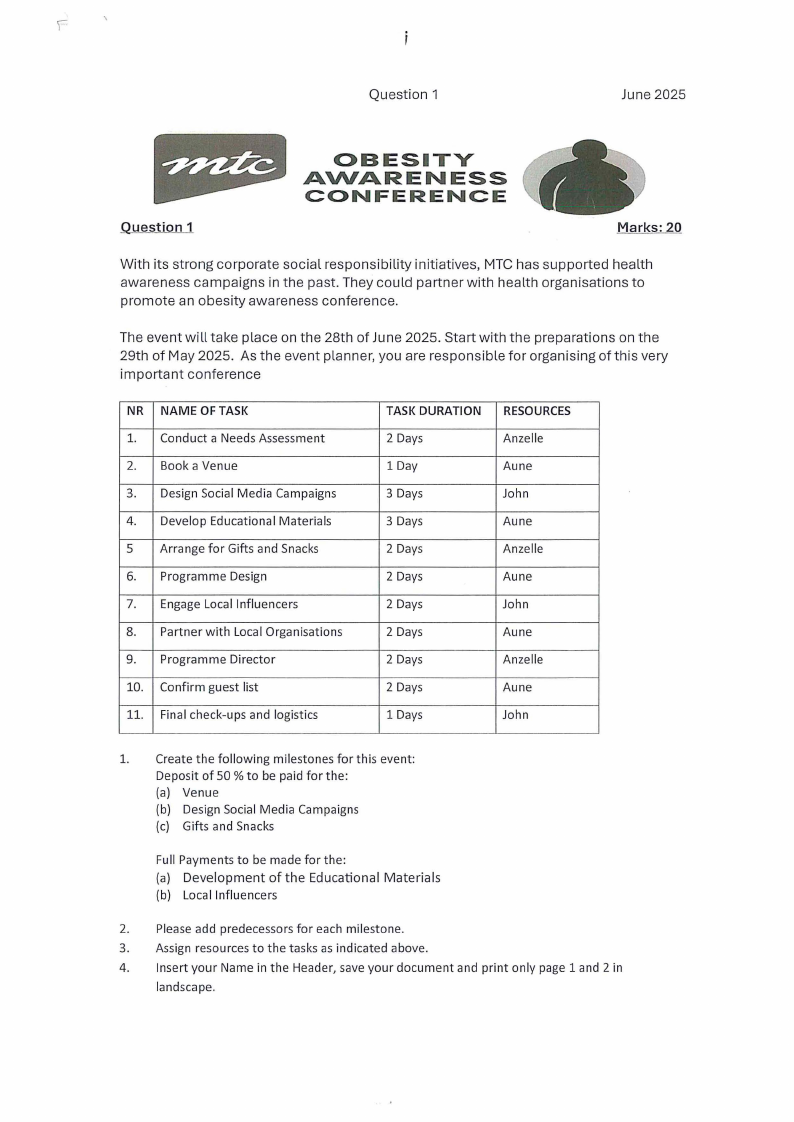
Question 1
OBESITY
AWARENESS
CONFERENCE
Marks: 20
With its strong corporate social responsibility initiatives, MTC has supported health
awareness campaigns in the past. They could partner with health organisations to
promote an obesity awareness conference.
The event will take place on the 28th of June 2025. Start with the preparations on the
29th of May 2025. As the event planner, you are responsible for organising of this very
important conference
NR NAME OF TASK
1. Conduct a Needs Assessment
2. Book a Venue
3. Design Social Media Campaigns
4. Develop Educational Materials
5 Arrange for Gifts and Snacks
6. Programme Design
7. Engage Local Influencers
8. Partner with Local Organisations
9. Programme Director
10. Confirm guest list
11. Final check-ups and logistics
TASK DURATION
2 Days
1 Day
3 Days
3 Days
2 Days
2 Days
2 Days
2 Days
2 Days
2 Days
1 Days
RESOURCES
Anzelle
Aune
John
Aune
Anzelle
Aune
John
Aune
Anzelle
Aune
John
1. Create the following milestones for this event:
Deposit of 50 % to be paid for the:
(a) Venue
(b) Design Social Media Campaigns
(c) Gifts and Snacks
Full Payments to be made for the:
(a) Development of the Educational Materials
(b) Local Influencers
2. Please add predecessors for each milestone.
3. Assign resources to the tasks as indicated above.
4. Insert your Name in the Header, save your document and print only page 1 and 2 in
landscape.
|
|
3 Page 3 |
▲back to top |
Question 2
June 2025
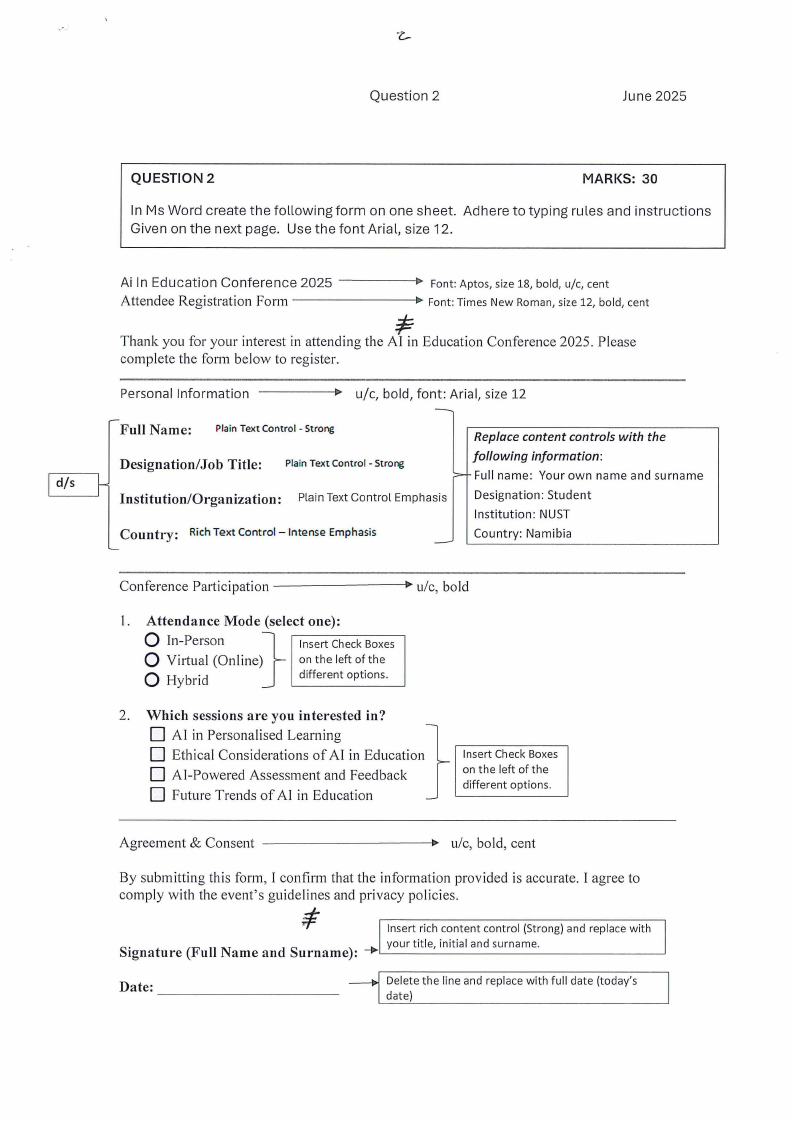
QUESTION 2
MARKS: 30
In Ms Word create the following form on one sheet. Adhere to typing rules and instructions
Given on the next page. Use the font Arial, size 12.
Ai In Education Conference 2025 -----1>
Attendee Registration Form
Font: Aptos, size 18, bold, u/c, cent
Font: Times New Roman, size 12, bold, cent
Thank you for your interest in attending the Al in Education Conference 2025. Please
complete the form below to register.
Personal Information
Full Name:
Plain Text Control - Strong
- u/c, bold, font: Arial, size 12
Replace content controls with the
Designation/Job Title: Plain Text Control - Strong
following information:
d/s
>- Full name: Your own name and surname
Institution/Organization:
Plain Text Control Emphasis
Designation: Student
Institution: NUST
Country: Rich Text Control - Intense Emphasis
Country: Namibia
Conference Participation ---------
u/c, bold
I. Attendance Mode (select one):
0 In-Person
}
Q Virtual (Online)
Q Hybrid
Insert Check Boxes
on the left of the
different options.
2. Which sessions are you interested in?
D AI in Personalised Learning
}
D Ethical Considerations of AI in Education
D AI-Powered Assessment and Feedback
D Future Trends of AI in Education
Insert Check Boxes
on th e left of t he
different options.
~------
Agreement & Consent
u/c, bold, cent
By submitting this form, I confirm that the information provided is accurate. I agree to
comply with the event's guidelines and privacy policies.
I
Insert rich content control (Strong) and replace with
Signature (Full Name and Surname): ___.,your title, initial and surname.
Date: ------------
Delete the line and replace with full date (today's
date)
|
|
4 Page 4 |
▲back to top |
Question 3
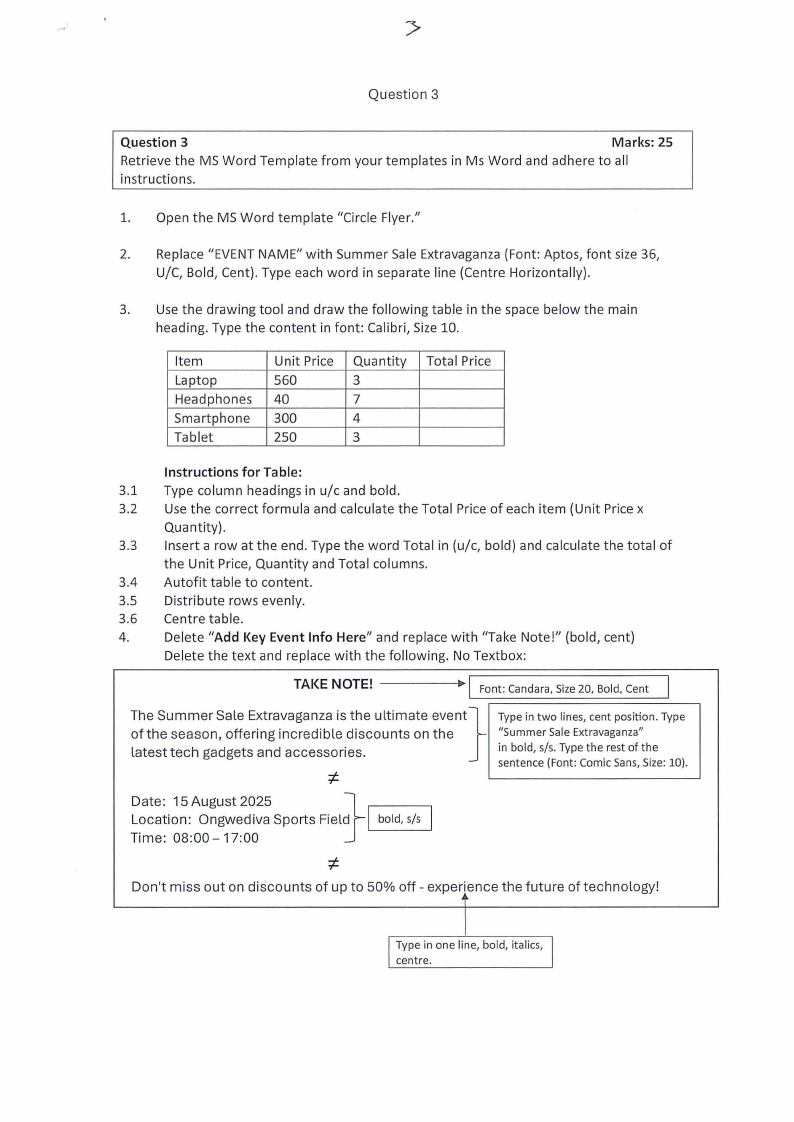
Question 3
Marks: 25
Retrieve the MS Word Template from your templates in Ms Word and adhere to all
instructions.
1. Open the MS Word template "Circle Flyer."
2. Replace "EVENT NAME" with Summer Sale Extravaganza (Font: Aptos, font size 36,
U/C, Bold, Cent). Type each word in separate line (Centre Horizontally).
3. Use the drawing tool and draw the following table in the space below the main
heading. Type the content in font: Calibri, Size 10.
Item
Laptop
Headphones
Smartphone
Tablet
Unit Price
560
40
300
250
Quantity
3
7
4
3
Total Price
Instructions for Table:
3.1 Type column headings in u/c and bold.
3.2 Use the correct formula and calculate the Total Price of each item (Unit Price x
Quantity).
3.3 Insert a row at the end. Type the word Total in (u/c, bold) and calculate the total of
the Unit Price, Quantity and Total columns.
3.4 Autofit table to content.
3.5 Distribute rows evenly.
3.6 Centre table.
4.
Delete "Add Key Event Info Here" and replace with "Take Note!" (bold, cent)
Delete the text and replace with the following. No Textbox:
------::-1 TAKE NOTE!
Font: Candara, Size 20, Bold, Cent
The Summer Sale Extravaganza is the ultimate event}
of the season, offering incredible discounts on the
latest tech gadgets and accessories.
t
Type in two lines, cent position. Type
"Summer Sale Extravaganza"
in bold, s/s. Type the rest of the
sentence (Font: Comic Sans, Size: 10).
Date: 15 August 2025
Location: Ongwediva Sports Field
Time: 08:00-17:00
I bold, s/s
'-----'
t
Don't miss out on discounts of up to 50% off - experience the future of technology!
Type in one line, bold, italics, I
I centre.
|
|
5 Page 5 |
▲back to top |
,.
Li
Question 4
Pivot Table
June 2025
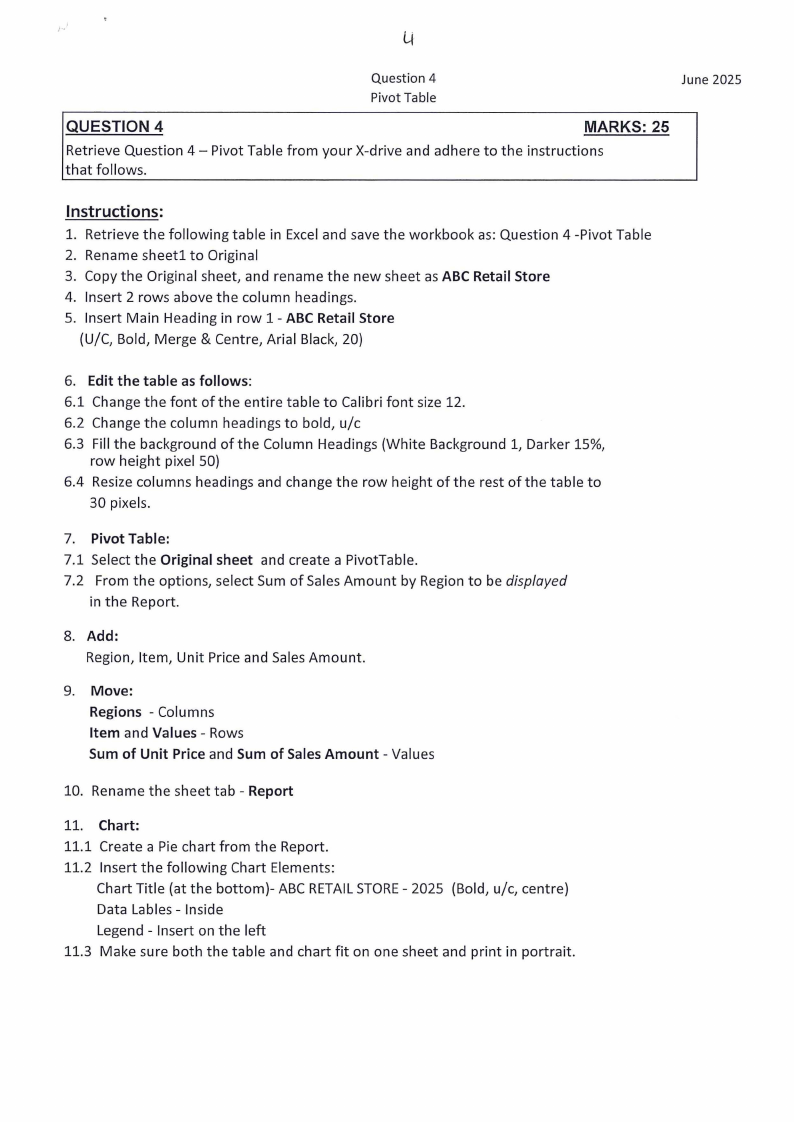
QUESTION 4
MARKS: 25
Retrieve Question 4 - Pivot Table from your X-drive and adhere to the instructions
that follows.
Instructions:
1. Retrieve the following table in Excel and save the workbook as: Question 4 -Pivot Table
2. Rename sheetl to Original
3. Copy the Original sheet, and rename the new sheet as ABC Retail Store
4. Insert 2 rows above the column headings.
5. Insert Main Heading in row 1- ABC Retail Store
{U/C, Bold, Merge & Centre, Arial Black, 20)
6. Edit the table as follows:
6.1 Change the font of the entire table to Calibri font size 12.
6.2 Change the column headings to bold, u/c
6.3 Fill the background of the Column Headings {White Background 1, Darker 15%,
row height pixel 50)
6.4 Resize columns headings and change the row height of the rest of the table to
30 pixels.
7. Pivot Table:
7.1 Select the Original sheet and create a PivotTable.
7.2 From the options, select Sum of Sales Amount by Region to be displayed
in the Report.
8. Add:
Region, Item, Unit Price and Sales Amount.
9. Move:
Regions - Columns
Item and Values - Rows
Sum of Unit Price and Sum of Sales Amount - Values
10. Rename the sheet tab - Report
11. Chart:
11.1 Create a Pie chart from the Report.
11.2 Insert the following Chart Elements:
Chart Title {at the bottom)- ABC RETAILSTORE- 2025 {Bold, u/c, centre)
Data Lables - Inside
Legend - Insert on the left
11.3 Make sure both the table and chart fit on one sheet and print in portrait.